Auditing and Reducing AWS CloudTrail Costs Across an AWS Organization
CloudTrail's free first copy of management events per region is generous, but redundant trails, data events, and organization trail overlap can quietly multiply your bill. Learn how to detect redundancy with a Python script that scans every account and region in your AWS Organization.
CloudTrail's free first copy of management events per region is generous, but redundant trails, data events, and organization trail overlap can quietly multiply your bill. Learn how to detect redundancy with a Python script that scans every account and region in your AWS Organization, and how to fix it.
As a Senior Cloud Architect at DoiT, I regularly help customers investigate unexpected cost increases in their AWS environments. One pattern I've seen more than once starts the same way: someone notices a spike in AWS CloudTrail costs in AWS Cost Explorer or a spend management tool like DoiT Analytics or DoiT Cost Anomalies, and the immediate reaction is confusion. "We didn't change anything, why did CloudTrail costs go up?"
When we dig in, the answer is almost always the same: trail redundancy. Multiple trails logging the same events in the same region, organization trails overlapping with account-level trails, or data and insights events left enabled from a proof of concept that was never cleaned up. The costs are real, but the root cause is invisible unless you know where to look.
In this post, I'll explain how CloudTrail pricing works, why redundancy happens so easily, and share a Python script you can use to audit every account and region in your AWS Organization to find exactly where the extra costs are coming from.
How CloudTrail Pricing Works
Before diving into the audit, it's important to understand what CloudTrail charges for and what's free. The pricing model has a generous free tier, but the boundaries are easy to cross without realizing it.
What's free:
- The first copy of management events delivered to Amazon S3 in each region. This is the default trail that most accounts have.
What costs money:
- Additional copies of management events: if you have two or more active trails logging management events in the same region, every copy beyond the first is charged at $2.00 per 100,000 events.
- Data events (e.g., S3 object-level operations, Lambda invocations): charged at $0.10 per 100,000 events delivered, per trail. If multiple trails capture the same data events, each trail's copy is charged separately.
- Network activity events: charged at $0.10 per 100,000 events delivered, per trail. Like data events, each additional trail capturing them multiplies the cost.
- Insights events: charged at $0.35 per 100,000 management events analyzed (or $0.03 per 100,000 data events analyzed), per trail that has Insights enabled. Each trail with Insights enabled incurs its own analysis charges.
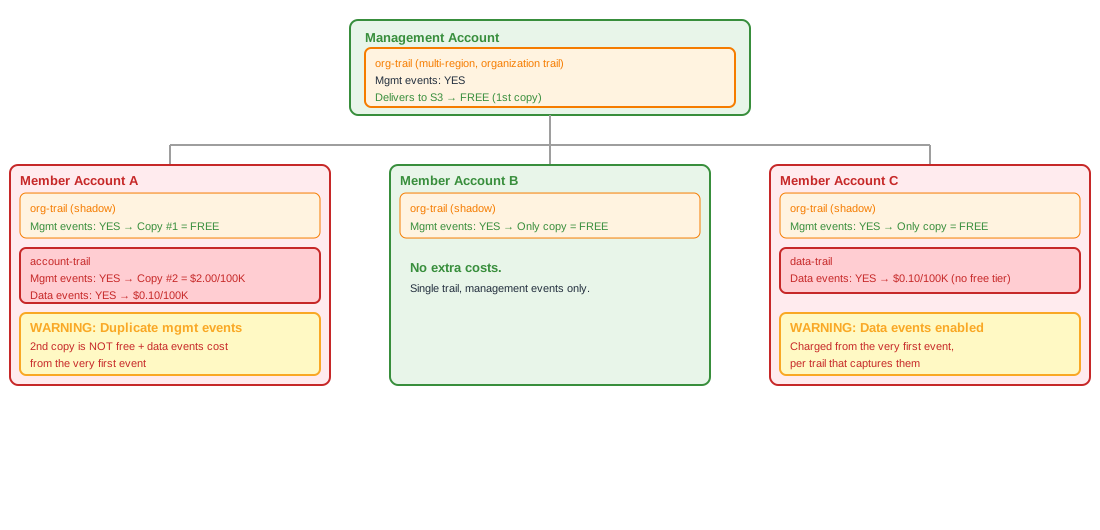
The critical detail is that the free tier only covers management events, and only the first copy per region per account. Data events, network activity events, and Insights are charged from the very first event, regardless of how many trails you have. For management events, the duplication trap is common: if an organization trail already delivers management events in a region, and a member account has its own trail doing the same, that second copy is billed at $2.00 per 100,000 events.
This is where costs silently accumulate, especially in organizations with dozens or hundreds of accounts.
The following diagram illustrates how an organization trail creates shadow copies in every member account, and how an additional account-level trail in the same region triggers cost duplication:
Why Redundancy Happens
In my experience, trail redundancy is rarely intentional. It typically results from a combination of:
- Siloed account ownership. Individual teams create their own trails without knowing that an organization trail already covers them. This is especially common in decentralized organizations where platform teams and application teams operate independently.
- Organization trails plus account-level trails. A security team enables an organization trail for compliance. Meanwhile, individual accounts already have their own trails, perhaps created by AWS Control Tower, a landing zone accelerator, or manual setup. Both are active, both log management events, and the overlap goes unnoticed.
- Data, insights, or network events left enabled. A team enables data event logging on an S3 bucket for a troubleshooting session or a proof of concept. The issue gets resolved, but the event selector is never reverted. Data events can generate massive volumes, and the cost adds up fast.
- Shadow trails from multi-region configurations. When a trail is configured as multi-region, it appears as a "shadow trail" in every region. This is expected behavior, but it means that a single multi-region trail appears in every region's trail list. If you're not aware of this, it's easy to think there are more trails than there actually are, or to create additional trails that duplicate what the multi-region trail already covers.
- No visibility across the organization. There's no built-in AWS dashboard that shows you "here are all the trails across all accounts and regions in your organization." Without that visibility, redundancy is almost guaranteed to creep in over time.
Spotting the First Signal
Before running any audit script, the first indicator of CloudTrail overcosts is often visible in your billing data. AWS Cost Explorer can show you CloudTrail costs broken down by region and usage type. If you see charges for ManagementEventsRecorded in regions where you expected only the free tier, that's a strong signal.
If you use a cloud spend management tool like DoiT Analytics, you can set up cost anomaly alerts or build reports that break down CloudTrail costs by linked account and region. This makes it easier to spot which specific accounts are contributing to the overspend, especially in large organizations where Cost Explorer alone can be overwhelming.
Either way, the billing data tells you that you have a problem. The audit script tells you where and why.
The Audit Script
I wrote a Python script that scans CloudTrail trails across all enabled regions in an AWS account, classifies each trail by its event types, and flags regions where redundancy is driving costs. The script supports both single-account and organization-wide scanning.
What the Script Does
For each region, the script:
- Lists all trails visible in that region (including shadow trails from multi-region configurations).
- For each trail, fetches the event selectors to determine which event types are being logged: management, data, insights, and network activity events.
- Checks whether the trail is actively logging.
- Produces a table with all trail details and a cost analysis summary that flags regions where:
- More than one active trail is capturing management events (additional copies are not free).
- One or more active trails are capturing data, insights, or network events (always charged).
The output is printed to the console and also saved as a Markdown report for easy sharing.
Prerequisites
- Python 3.8+ with
boto3installed. - AWS credentials with the permissions described below.
Setting up the environment:
python3 -m venv .venv
source .venv/bin/activate
pip install -r requirements.txt
NOTE: The script uses DescribeTrails with includeShadowTrails=True, which means multi-region trails will appear in every region. The script marks these as shadow trails so you can distinguish them from locally-created trails.
Required IAM Permissions
For the caller (management account or SSO session):
{
  "Version": "2012-10-17",
  "Statement": [
    {
      "Sid": "CloudTrailAuditCaller",
      "Effect": "Allow",
      "Action": [
        "ec2:DescribeRegions",
        "sts:GetCallerIdentity",
        "iam:ListAccountAliases",
        "organizations:ListAccounts",
        "sts:AssumeRole"
      ],
      "Resource": "*"
    }
  ]
}
NOTE: organizations:ListAccounts and sts:AssumeRole are only needed when using the --org flag. For single-account scans, only ec2:DescribeRegions, sts:GetCallerIdentity, and iam:ListAccountAliases are required on the caller, plus the CloudTrail permissions below.
For the assumed role in each member account (e.g., OrganizationAccountAccessRole or a custom role):
{
  "Version": "2012-10-17",
  "Statement": [
    {
      "Sid": "CloudTrailAuditReadOnly",
      "Effect": "Allow",
      "Action": [
        "cloudtrail:DescribeTrails",
        "cloudtrail:GetEventSelectors",
        "cloudtrail:GetInsightSelectors",
        "cloudtrail:GetTrailStatus",
        "ec2:DescribeRegions"
      ],
      "Resource": "*"
    }
  ]
}
If you prefer least privilege over using the default OrganizationAccountAccessRole (which has AdministratorAccess), create a dedicated role with only the four CloudTrail read actions above and pass its name via --role-name.
Using AWS IAM Identity Center (SSO)
If your organization uses AWS IAM Identity Center, you can simplify authentication by using an SSO profile instead of managing IAM access keys. The script works transparently with SSO because boto3 handles SSO token resolution when you specify a profile.
To set this up:
- Configure an SSO session in your AWS CLI:
aws configure sso
- This creates a profile in
~/.aws/configthat looks like:
[profile cloudtrail-audit]
sso_session = my-org
sso_account_id = 123456789012
sso_role_name = CloudTrailAuditRole
region = eu-west-1

[sso-session my-org]
sso_start_url = https://my-org.awsapps.com/start
sso_region = eu-west-1
sso_registration_scopes = sso:account:access
- Log in and run the script:
aws sso login --profile cloudtrail-audit
python cloudtrail-audit.py --profile cloudtrail-audit --org
The SSO profile authenticates you to the management account. From there, the --org flag uses AssumeRole to iterate through member accounts, exactly as it would with static credentials. The only requirement is that the SSO permission set assigned to your user includes organizations:ListAccounts and sts:AssumeRole, and that the target role exists in each member account.
NOTE: If your Identity Center permission set is already assigned to multiple accounts individually, you could also run the script once per account without --org, using a different --profile for each. However, the --org + AssumeRole approach is far more practical for organizations with more than a handful of accounts.
The Script
The full script is available on GitHub:
https://github.com/javiercarreraruiz/cloudtrail-cost-audit
Below are the key functions that drive the audit logic. The classify_events function parses both classic and advanced event selectors to determine what each trail is logging:
def classify_events(ev: Dict[str, Any]) -> Tuple[bool, bool, bool]:
    mgmt, data, network = False, False, False
    for sel in ev.get("EventSelectors", []):
        if sel.get("IncludeManagementEvents"):
            mgmt = True
        if sel.get("DataResources"):
            data = True
    for a in ev.get("AdvancedEventSelectors", []):
        for fs in a.get("FieldSelectors", []):
            if fs.get("Field") == "eventCategory":
                vals = fs.get("Equals", [])
                mgmt = mgmt or "Management" in vals
                data = data or "Data" in vals
                network = network or "NetworkActivity" in vals
    return mgmt, data, network
The analyze_costs function flags regions where redundancy is driving costs:
def analyze_costs(rows: List[Dict[str, str]]) -> str:
    lines = []
    for region in sorted(set(r["Region"] for r in rows)):
        trails = [r for r in rows if r["Region"] == region]
        active = [t for t in trails if t["IsLogging"] == "yes"]
        mgmt_count = sum(1 for t in active if t["Mgmt"] == "yes")

        has_data = any(t["Data"] == "yes" for t in active)
        has_insights = any(t["Insights"] == "yes" for t in active)
        has_network = any(t["Network"] == "yes" for t in active)

        cond_mgmt = mgmt_count > 1
        cond_other = has_data or has_insights or has_network

        if cond_mgmt or cond_other:
            parts = []
            if cond_mgmt:
                parts.append(f"more than one active trail capturing management events ({mgmt_count})")
            if cond_other:
                kinds = [k for k, v in [("data", has_data), ("insights", has_insights), ("network", has_network)] if v]
                parts.append("active trails capturing " + "/".join(kinds) + " events")
            lines.append(
                f"WARNING  {region} ({len(trails)} trails, {len(active)} active): "
                f"costs apply: {' AND '.join(parts)}"
            )
        else:
            lines.append(f"OK  {region} ({len(trails)} trails, {len(active)} active): no extra costs detected")
    return "\n".join(lines)
Regions within each account are scanned in parallel using concurrent.futures.ThreadPoolExecutor for speed, and each account's enabled regions are discovered independently (since opt-in regions vary per account).
Running the Script
Single account (current credentials):
python cloudtrail-audit.py
Single account with a specific profile and region:
python cloudtrail-audit.py --profile my-sso-profile --region eu-west-1,us-east-1
All accounts in the AWS Organization:
python cloudtrail-audit.py --profile my-sso-profile --org
All accounts using a custom role (least privilege):
python cloudtrail-audit.py --profile cloudtrail-audit --org --role-name CloudTrailAuditRole
Troubleshooting: "Skipped (access denied to role ...)"
If the script skips certain accounts, the most common causes are:
- The role doesn't exist in the target account. This happens when accounts were invited into the organization rather than created through it. The
OrganizationAccountAccessRoleis only auto-created for accounts created via AWS Organizations. - The role's trust policy points to a different management account. This occurs when accounts were moved between organizations. The trust policy still references the old management account.
To fix either case, run the following from a profile that has access to the target account (e.g., via an SSO permission set assigned directly to that account):
# If the role doesn't exist, create it:
aws iam create-role \
  --role-name OrganizationAccountAccessRole \
  --assume-role-policy-document '{
    "Version": "2012-10-17",
    "Statement": [{
      "Effect": "Allow",
      "Principal": {"AWS": "arn:aws:iam::<MANAGEMENT_ACCOUNT_ID>:root"},
      "Action": "sts:AssumeRole"
    }]
  }' \
  --profile <PROFILE_WITH_ACCESS_TO_TARGET_ACCOUNT>

# Attach the required permissions (or use the least-privilege policy from above):
aws iam attach-role-policy \
  --role-name OrganizationAccountAccessRole \
  --policy-arn arn:aws:iam::aws:policy/AdministratorAccess \
  --profile <PROFILE_WITH_ACCESS_TO_TARGET_ACCOUNT>

# If the role exists but trusts the wrong account, update the trust policy:
aws iam update-assume-role-policy \
  --role-name OrganizationAccountAccessRole \
  --policy-document '{
    "Version": "2012-10-17",
    "Statement": [{
      "Effect": "Allow",
      "Principal": {"AWS": "arn:aws:iam::<MANAGEMENT_ACCOUNT_ID>:root"},
      "Action": "sts:AssumeRole"
    }]
  }' \
  --profile <PROFILE_WITH_ACCESS_TO_TARGET_ACCOUNT>
NOTE: If you prefer least privilege, attach only the CloudTrail read-only policy (shown in the Required IAM Permissions section) instead of AdministratorAccess.
Understanding the Output
The script produces a table per account with one row per trail per region. Here's what each column means:
| Column | Description |
|---|---|
Region | The AWS region where the trail was found |
TrailName | Name of the CloudTrail trail |
HomeRegion | The region where the trail was originally created |
IsMultiRegion | Whether the trail is configured to log events in all regions |
Org | Whether this is an organization trail (applies to all member accounts) |
Shadow | Whether this trail appears in this region because it's multi-region, but was created in a different home region |
Mgmt | Whether the trail logs management events |
Data | Whether the trail logs data events (e.g., S3 object operations, Lambda invocations) |
Insights | Whether CloudTrail Insights is enabled |
Network | Whether network activity events are logged |
IsLogging | Whether the trail is currently active |
The cost analysis summary below the table flags two conditions:
- More than one active trail capturing management events in a region. The first copy is free; every additional copy costs $2.00 per 100,000 events. In a busy account, this adds up quickly.
- Any active trail capturing data, insights, or network events. These are always charged per trail that captures them. Multiple trails logging the same data or network activity events multiply the cost, since each trail's delivered copy is billed independently.
Example Output
Here's a sanitized example from running the script against a real AWS Organization with 10 accounts. I'll show the output for two accounts that had findings, followed by the organization summary.
Account with duplicate management event trails:
This account had two multi-region trails, both logging management events. The second copy is billed in every region where both trails are active:
================================================================================
Account: dev-platform (111111111111)
================================================================================
| Region         | TrailName      | HomeRegion | IsMultiRegion | Org | Shadow | Mgmt | Data | Insights | Network | IsLogging |
| ---            | ---            | ---        | ---           | --- | ---    | ---  | ---  | ---      | ---     | ---       |
| eu-west-1      | main-trail     | eu-west-1  | yes           | no  | no     | yes  | no   | no       | no      | **yes**   |
| eu-west-1      | legacy-trail   | eu-west-1  | yes           | no  | no     | yes  | no   | no       | no      | **yes**   |
| us-east-1      | main-trail     | eu-west-1  | yes           | no  | yes    | yes  | no   | no       | no      | **yes**   |
| us-east-1      | legacy-trail   | eu-west-1  | yes           | no  | yes    | yes  | no   | no       | no      | **yes**   |
...
(repeated across 30 enabled regions)

WARNING  eu-west-1 (2 trails, 2 active): costs apply: more than one active trail capturing management events (2)
WARNING  us-east-1 (2 trails, 2 active): costs apply: more than one active trail capturing management events (2)
...
(warnings in all 30 regions)
Account with data events enabled on a multi-region trail:
This account had a single trail, but with data events enabled. Since data events have no free tier, every region incurs charges:
================================================================================
Account: analytics-prod (222222222222)
================================================================================
| Region         | TrailName | HomeRegion   | IsMultiRegion | Org | Shadow | Mgmt | Data | Insights | Network | IsLogging |
| ---            | ---       | ---          | ---           | --- | ---    | ---  | ---  | ---      | ---     | ---       |
| eu-central-1   | events    | eu-central-1 | yes           | no  | no     | yes  | yes  | no       | no      | **yes**   |
| eu-west-1      | events    | eu-central-1 | yes           | no  | yes    | yes  | yes  | no       | no      | **yes**   |
| us-east-1      | events    | eu-central-1 | yes           | no  | yes    | yes  | yes  | no       | no      | **yes**   |
...
(repeated across 19 enabled regions)

WARNING  eu-central-1 (1 trails, 1 active): costs apply: active trails capturing data events
WARNING  eu-west-1 (1 trails, 1 active): costs apply: active trails capturing data events
...
(warnings in all 19 regions)
Organization summary (printed at the end of the run):
================================================================================
ORGANIZATION SUMMARY
================================================================================
  Account                              Status
  -----------------------------------  --------------------------------------------------
  shared-services (111111111111)       No trails
  security-audit (222222222222)        Skipped (no access)
  dev-platform (333333333333)          WARNING: duplicate mgmt events on 2 trails in 30 region(s)
  staging (444444444444)               1 trail(s), no extra costs
  dev-sandbox-1 (555555555555)         No trails
  dev-sandbox-2 (666666666666)         No trails
  analytics-prod (777777777777)        WARNING: data events on "events" in 19 region(s)
  networking (888888888888)            1 trail(s), no extra costs
  logging (999999999999)               Skipped (no access)
  org-management (000000000000)        1 trail(s), no extra costs

  Scanned: 8  |  Skipped: 2  |  With cost warnings: 2
The summary immediately highlights which accounts need attention. In this case, dev-platform has a redundant trail that should be consolidated, and analytics-prod has data events enabled across all regions, which may or may not be intentional.
Reading the Results and Taking Action
Once you have the audit output, the remediation path depends on what you find.
Multiple management event trails in the same region
This is the most common source of unexpected costs. If an organization trail already covers management events for all accounts, account-level trails logging the same events are redundant. You can either:
- Stop logging on the redundant trail:
aws cloudtrail stop-logging --name <trail-name> --region <region> - Delete the trail entirely:
aws cloudtrail delete-trail --name <trail-name> --region <region>
NOTE: Before removing any trail, confirm with your security and compliance teams. Some organizations require account-level trails for regulatory reasons, even if an organization trail exists. In that case, the cost is intentional and should be documented as such.
Data, insights, or network events enabled
These event types are always charged. If they were enabled for testing or troubleshooting and are no longer needed, you can remove them by updating the trail's event selectors:
aws cloudtrail put-event-selectors \
  --trail-name <trail-name> \
  --event-selectors '[{"ReadWriteType":"All","IncludeManagementEvents":true,"DataResources":[]}]'
If data events are required for compliance or operational visibility, the cost is justified, but you should ensure they're scoped to only the resources that need them (e.g., specific S3 buckets rather than all S3 objects).
Organization trail overlap
When the script detects active organization trails, it prints a warning because this significantly increases the probability of cost duplication across member accounts. The organization trail delivers management events to every member account's region. If any member account also has its own trail, that's a second copy.
The recommended approach is to align on a single organization-wide CloudTrail logging strategy:
- Use the organization trail as the standard for management events.
- If account-level trails are required, coordinate event types to avoid duplication.
- Use AWS Organizations Service Control Policies (SCPs) to prevent member accounts from creating additional trails if centralized logging is the policy.
Validate after remediation
After making changes, re-run the script to confirm that the redundancy is resolved. Cost changes will reflect in the next billing cycle, so also monitor Cost Explorer or your spend management tool over the following days to verify the reduction.
Using AI to Interpret the Results
The script's output is structured Markdown, which makes it straightforward to feed into an AI coding assistant for interpretation and remediation guidance. If you use Kiro CLI, you can save the audit output and ask it to analyze the results:
python cloudtrail-audit.py --profile my-sso-profile --org > audit-report.md 2>progress.log
kiro-cli chat "Read audit-report.md and create a remediation plan prioritized by estimated cost impact."
This gives you a natural-language summary of the findings along with ready-to-run CLI commands tailored to your specific environment. It's particularly useful when scanning large organizations where the raw output spans hundreds of lines across dozens of accounts.
You can also ask for a focused analysis:
kiro-cli chat "Read audit-report.md. For the accounts with WARNING status, suggest the exact AWS CLI commands to fix the redundancy."
This approach turns the audit from a one-time scan into a workflow: detect redundancy, get AI-assisted analysis, review the suggested changes, and apply them with confidence.
Conclusion
CloudTrail costs are one of those line items that can grow silently in a multi-account AWS Organization. The free tier is generous (one copy of management events per region), but it's surprisingly easy to exceed it through trail redundancy, leftover data event configurations, and organization trail overlap.
Key Takeaways:
- The first signal is in your billing data. Use AWS Cost Explorer or a spend management tool like DoiT Analytics to spot CloudTrail cost anomalies by account and region.
- Redundancy is the root cause. More than one active trail logging management events in the same region means you're paying for additional copies at $2.00 per 100,000 events.
- Organization trails increase the risk. They cover all member accounts, so any account-level trail in the same region creates duplication.
- Data, insights, and network events are always charged. Ensure they're intentionally enabled and scoped to the resources that need them. Multiple trails capturing the same events multiply the cost.
- Visibility is the fix. Use the audit script to scan all accounts and regions, identify redundancy, and validate after remediation.
The lesson is familiar: you don't always need more trails. Often, you need fewer, and better visibility into the ones you already have.