The new AWS Resilience Hub found a Failure Mode missed for two years
AWS relaunched Resilience Hub in May 2026 with AI-powered failure mode analysis and dependency discovery via DNS query logs. Here is what it found when I pointed it at a customer's production workload, and why the dependency discovery feature is the part nobody is writing about.
Working with one of our customers at DoiT recently, I ran the next generation of AWS Resilience Hub against a production workload that the team had considered well-architected for over a year. The application is a multi-AZ SaaS platform: auto-scaling Amazon EC2 fleet behind an Application Load Balancer, Amazon RDS Multi-AZ for the primary database, Amazon ElastiCache for session storage, and a hardened deployment pipeline. The team had run AWS Well-Architected Reviews on it. RTO was documented at 15 minutes, RPO at 5 minutes.
Among the findings the assessment surfaced was one the team had not previously mapped: a direct HTTPS dependency on a third-party payment provider's API, called synchronously from the application layer in us-east-1, with no circuit breaker, no retry with exponential backoff, and no fallback behavior in the event of a provider outage.
The payment API was never documented as an external dependency. The DNS query log analysis in the new Resilience Hub found it automatically by analyzing Amazon Route 53 Resolver logs for the application VPC.
What Changed in the Next Generation of AWS Resilience Hub
The May 2026 release is a significant rearchitecting of the service, not an incremental update. AWS's launch post, Introducing the next generation of AWS Resilience Hub, covers the full feature set. The headline features are:
AI-powered failure mode analysis. After assessing your service against defined resilience policies and AWS Well-Architected best practices, a multi-agent AI system generates findings that describe potential failure modes, their severity, reasoning specific to your architecture, and remediation recommendations covering mitigation, observability, and testing. Each finding maps to specific policy requirements so you know exactly which resilience targets are at risk.
Dependency discovery via DNS query logs. This is the feature that caught the payment API. When you enable dependency discovery (an optional add-on at $10/service/month), Resilience Hub analyzes Route 53 DNS resolver query logs with a 35-day lookback window. It identifies every DNS endpoint your service's compute resources resolve: AWS service endpoints, internal endpoints, and third-party external endpoints like Stripe or LaunchDarkly. It continuously monitors hourly to detect new dependencies. No agents or code changes required.
Modular resilience policies. Instead of a single RTO/RPO policy applied to everything, you can now construct policies by selecting composable requirements: Availability SLO targets, Multi-Region disaster recovery (with RTO/RPO), Multi-AZ disaster recovery (with RTO/RPO), and data recovery objectives. Policies can be applied at the user journey level or individual service level.
Organization-wide governance. Via AWS Organizations integration, a delegated administrator gets centralized visibility into resilience posture across all member accounts, with data aggregated to a home Region for cross-organization dashboards and reporting.
Running an Assessment: Step by Step
The next generation uses a new application modeling hierarchy: Systems (your business application), User Journeys (critical business paths), and Services (the building blocks comprising AWS resources). You define where to find your resources (CloudFormation stacks, Terraform state files, resource tags, or Amazon EKS clusters), and Resilience Hub automatically discovers and maps them into a topology.
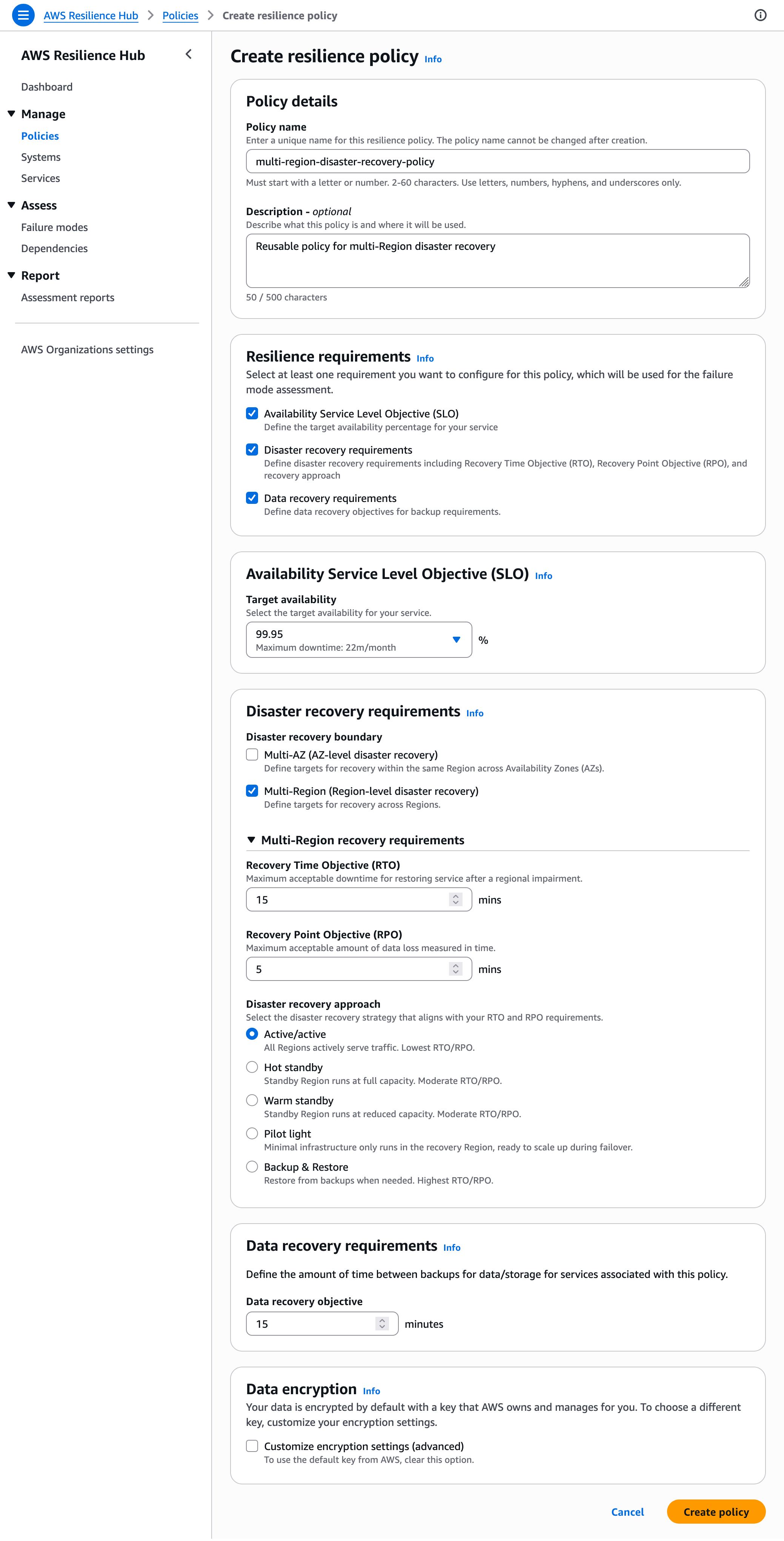
Step 1: Configure a resilience policy. Define your resilience targets. The modular policy structure lets you select which requirements matter:
| Policy component | Example target |
|---|---|
| Availability SLO | 99.99% |
| Multi-Region DR | RTO: 15 min, RPO: 5 min |
| Multi-AZ DR | RTO: 5 min, RPO: 1 min |
| Data recovery objective | 1 hour between backups |
aws resiliencehubv2 create-policy \
  --name "Critical Service Policy" \
  --multi-region '{"rtoInMinutes": 15, "rpoInMinutes": 5, "disasterRecoveryApproach": "WARM_STANDBY"}' \
  --availability-slo '{"target": 99.99}'
Setting realistic, differentiated targets here matters. If you set everything to 99.99% with a 1-minute RTO, the failure mode assessment will flag every finding as critical, including ones that are genuinely acceptable for low-priority services.
Step 2: Create a system and service. A system represents your business application. A service is a deployable component within it. After creating the service, you add input sources (CloudFormation stacks, resource tags, Terraform state files, or EKS clusters) and Resilience Hub discovers the resources and builds a topology.
aws resiliencehubv2 create-system \
  --name "my-saas-platform"

aws resiliencehubv2 create-service \
  --name "checkout-service" \
  --associated-systems '[{"systemArn": "arn:aws:resiliencehub:us-east-1:123456789012:system/my-saas-platform"}]' \
  --regions '["us-east-1"]' \
  --permission-model '{"invokerRoleName": "AWSResilienceHubAssessmentRole"}'

aws resiliencehubv2 create-input-source \
  --service-arn "arn:aws:resiliencehub:us-east-1:123456789012:service/checkout-service" \
  --resource-configuration '{"cfnStackArn": "arn:aws:cloudformation:us-east-1:123456789012:stack/checkout-stack/xyz"}'
Step 3: Run a failure mode assessment. Navigate to your service in the console and choose Run failure mode assessment. The assessment runs asynchronously, typically completing in 5 to 15 minutes depending on service complexity.
Step 4 (optional): Enable dependency discovery. On the service's Assessment tab, choose Enable dependency discovery. The service begins analyzing 35 days of historical DNS data from your VPC's Route 53 resolvers and then continuously monitors hourly for new dependencies. Prerequisites: your compute resources must reside in a VPC configured to use Route 53 DNS resolvers. No agents, no code changes, no manual log configuration required.
NOTE: Dependency discovery is an optional paid add-on ($10/service/month). The failure mode assessment runs without it, but you will miss external and cross-region endpoint dependencies that only DNS analysis can surface. For the payment API finding described above, this feature was what made the discovery possible.
Reading the Failure Mode Analysis Output
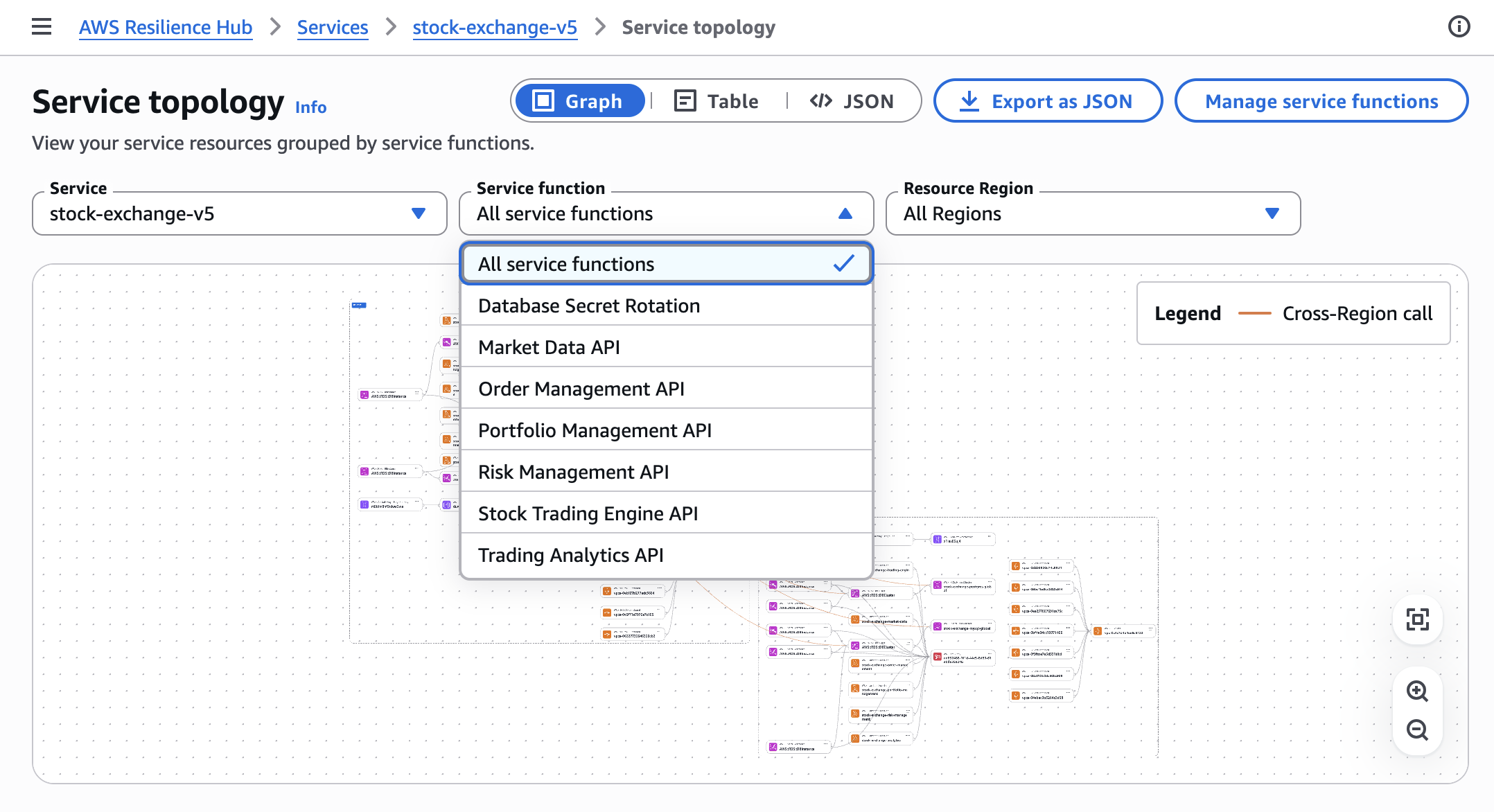
Each failure mode finding includes: a finding name, a detailed description of the failure mode, reasoning specific to your architecture, severity (High/Medium/Low), a failure category (shared fate, excessive load, excessive latency, misconfiguration and bugs, or single points of failure), the policy component it relates to, and three types of recommendations: mitigation (infrastructure/configuration change), observability (monitoring improvements), and testing (validation steps).
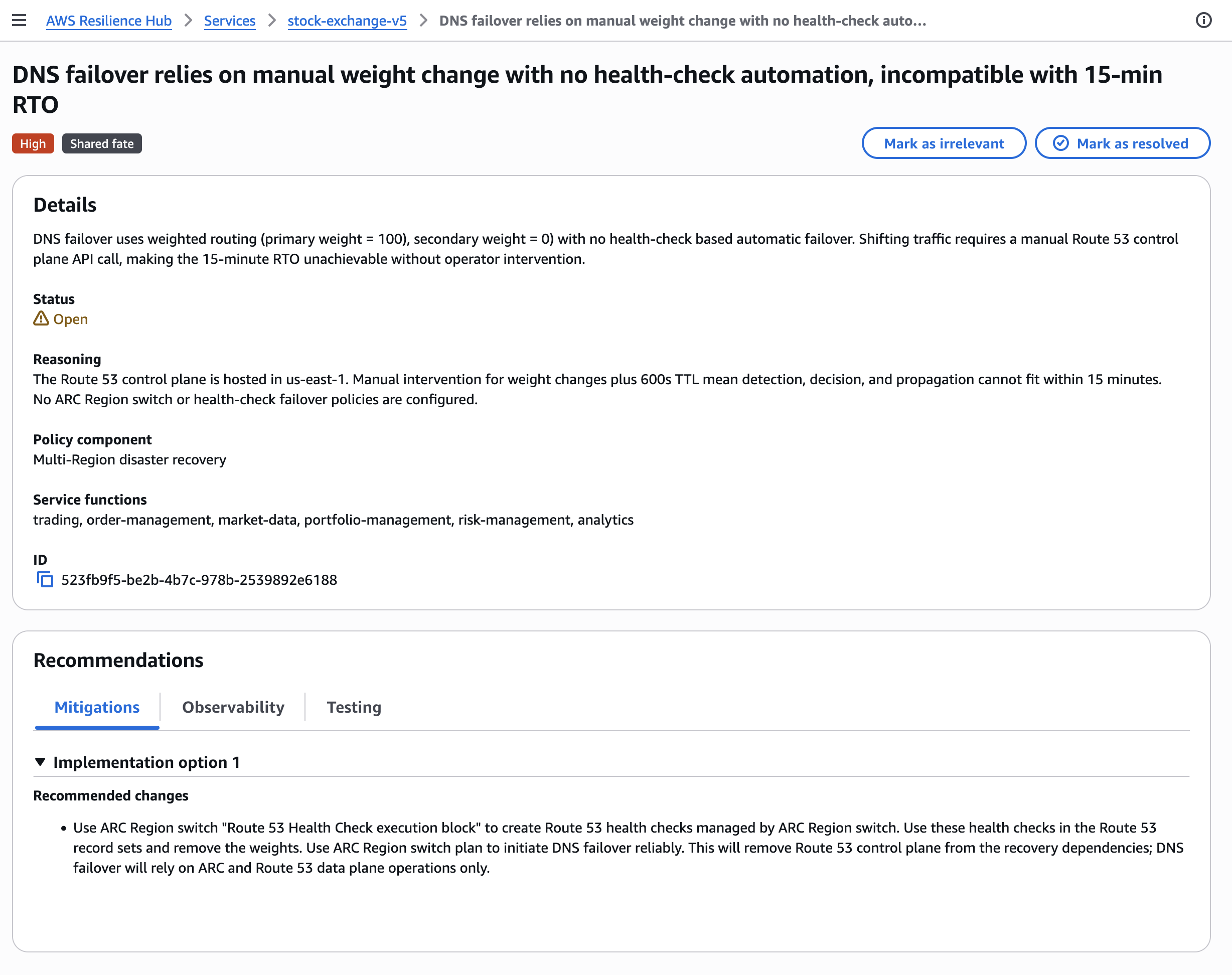
For the payment API dependency finding, the analysis covered the following failure dimensions: DNS resolution failure for the external endpoint, TCP connection timeout, elevated HTTP 5xx response rates from the provider, and latency spikes caused by cross-region routing. For each of these, the assessment noted that synchronous payment processing requests would fail or time out without fallback behavior, blocking order completion.
The recommended remediation pointed to two concrete patterns: a circuit breaker to fail fast when the provider is unreachable, and an asynchronous order queuing fallback that accepts orders optimistically and processes payments once the provider recovers.
The finding is not "add retries." It identifies the specific dependency, the specific failure modes, and a specific architectural response. That level of specificity is what distinguishes this from a generic Well-Architected checklist item.
NOTE: The quality of the AI failure mode analysis improves significantly when your service's input sources accurately represent your deployed infrastructure. Resilience Hub cannot analyze resources it cannot discover. If your application has resources deployed outside of your declared input sources (legacy instances, manually created security groups), add them via resource tags or additional CloudFormation stacks before running the assessment. You can also upload service design files and add assertions to steer the AI agents toward more relevant findings.
Acting on the Findings
The assessment produced several findings across different priority levels: some already tracked in the team's backlog, some informational, and a few high-priority items including the payment API dependency.
For the payment API finding, we implemented two changes:
Circuit breaker via Lambda: A thin Lambda function sits between the application and the payment API. It tracks the error rate over a 60-second rolling window. If the error rate exceeds 20%, it opens the circuit and returns a graceful degradation response to the application, queuing the payment for async retry.
import boto3
import json

dynamodb = boto3.resource('dynamodb')
table = dynamodb.Table('circuit-breaker-state')

def handler(event, context):
    state = table.get_item(Key={'service': 'payment-api'}).get('Item', {})

    if state.get('status') == 'OPEN':
        # Circuit is open: queue for async processing
        queue_payment_async(event['payment'])
        return {'status': 'queued', 'message': 'Payment queued for processing'}

    try:
        result = call_payment_api(event['payment'])
        record_success('payment-api')
        return result
    except Exception as e:
        error_rate = record_failure('payment-api')
        if error_rate > 0.20:
            open_circuit('payment-api')
        raise
Async fallback queue: An Amazon SQS queue accepts payment requests when the circuit is open. An AWS Lambda function polls the queue and retries the payment API with exponential backoff once the circuit closes.
After implementing these two changes, we re-ran the Resilience Hub assessment and the finding was resolved. The checkout flow now has a defined degradation path during a provider outage rather than an undefined failure mode.
The Dependency Discovery Is the Feature Worth Your Attention
The AI failure mode analysis is well-executed and generates genuinely useful output. But the dependency discovery via DNS query logs is the feature that deserves more attention than it is getting.
Every application has undocumented dependencies. They accumulate over years: a third-party geolocation API added during a feature sprint, a license validation endpoint that runs on startup, a data enrichment service integrated by a team that has since been reorganized. These dependencies appear nowhere in your architecture diagrams, your Well-Architected reviews, or your runbooks. They are invisible until they fail at 2am during a regional event.
The DNS query log analysis makes them visible automatically. That alone is worth enabling the feature.
Conclusion
The next generation of AWS Resilience Hub is a meaningful improvement over its predecessor. The dependency discovery found a real production risk that two years of manual reviews had missed. The AI failure mode assessment is specific enough to be actionable, not just informational.
For any team that has run a Well-Architected Review in the past 12 months and considers their workload well-covered, I would recommend running a Resilience Hub assessment. The dependency discovery alone is worth the setup time.
Key Takeaways:
- Dependency discovery automatically maps external and cross-region endpoints your service depends on using 35 days of DNS query history, including undocumented third-party dependencies. No agents or code changes required: just enable it on your service.
- AI-powered failure mode assessments produce specific findings with severity, architectural reasoning, and three-part recommendations (mitigation, observability, testing) per failure mode.
- Modular resilience policies with composable requirements (Availability SLO, Multi-Region DR, Multi-AZ DR, Data recovery) let you set differentiated targets per service.
- Pricing: $15/service/month (includes 2 assessments), dependency discovery is an additional $10/service/month.